OREUM
A hiking community web service for recording and sharing routes on a map, segment by segment. A team of four built it as the graduation project of the KDT Full-stack Bootcamp (Gangnam HiMedia), and it won the graduation-project Excellence Award. I set up the initial structure of both repositories and the server configuration, and built the map (mountain search, mountain forecast, trails), curation posts, social login and S3 upload on both server and screen. The demo ran locally and the source is private.
Role
Team of 4 — repository setup and server config, map and mountain forecast, curation posts, social login and S3 upload (Spring Boot, React)
Period
2025.06 – 2025.07 (KDT graduation project)
The team built it between June 2 and July 3, 2025; my feature line ran mountain locations → cached mountain forecast → map → curation posts (posts that record a route segment by segment) → authors shown on the map. Teammates built goods and payments, regular login, sign-up and My Page, the home feed, and sub-community creation and feeds; the repositories contain no deployment setup.
Demo
Curation post. Markers placed on the map draw the route; each segment gets a point name, facilities, notes and a video; the detail page then shows the segment cards and the route map.
Map. A mountain search shows forecast cards by date and hour and the trails; a trail info popup opens, and an author’s profile marker leads to a curation post.
Both clips are feature segments cut from the demo videos in the team presentation (Figma) (July 2025), without sound. They show a local development server, and the nicknames on screen are generated by the service.
Scope
| Area | Me | Teammates |
|---|---|---|
| Repository skeleton and server config | Initial structure of both repositories (Spring Boot project; React routes, Redux, dev proxy), server configuration and build files | Part of the CORS allow list |
| Map | Mountain search, mountain forecast collection and Redis cache, trail display, author profiles on the map — server and screen | — |
| Curation posts | Editor (markers and route on the map, segment input), saving the post to MySQL and the segments to MongoDB, list and search, detail screen | Server-side joining of segments in the detail API |
| Auth and media | Social login (Naver, Google) with JWT cookies, restoring the login state on reload, S3 upload with CloudFront URLs | Regular login, sign-up, ID and password recovery, My Page; profile image upload |
| Community | Community search, my communities, stats cards | Creating sub-communities and custom feeds; the home feed; most of the regular post write and edit forms |
| Goods and payments | — | Goods, cart, orders, payments (Iamport), reviews |
The Flutter app lives in a separate repository and is not covered here.
System architecture
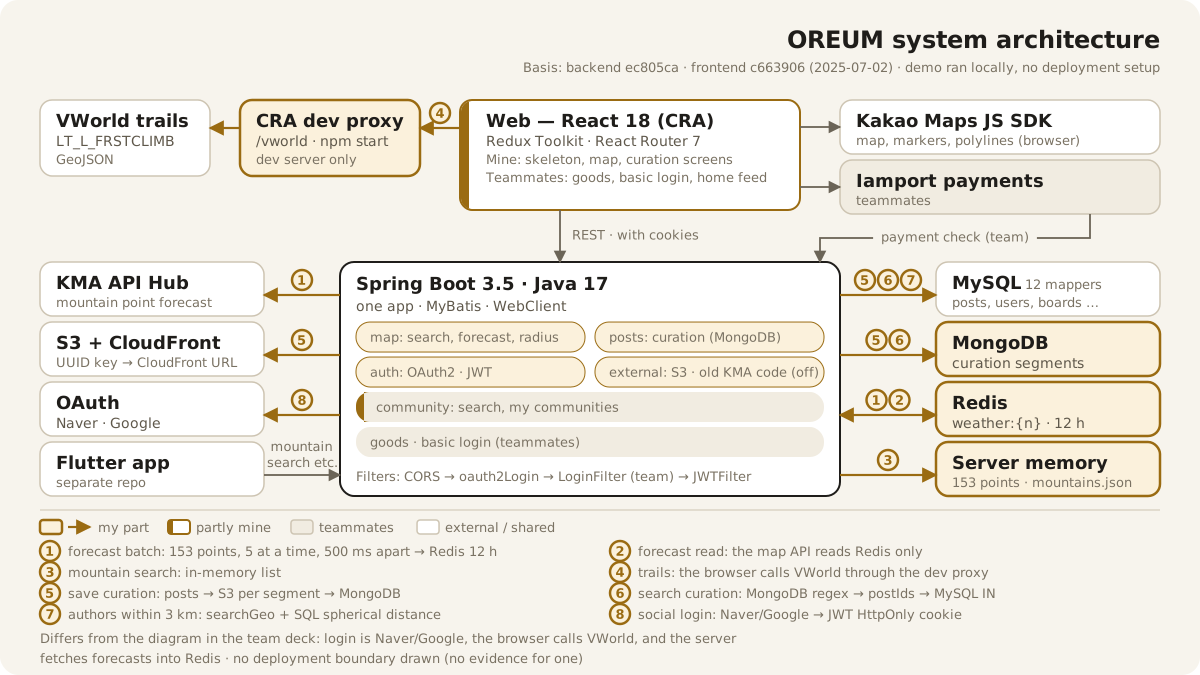
The architecture diagram is the cover image above. Gold marks my part; the React web client calls a single Spring Boot app over REST, and the browser draws the map with the Kakao Maps SDK. The numbers ①–⑧ on the arrows match the numbers in the sections below.
It differs from the diagram in the team presentation in three places. The login providers are Naver and Google, the browser calls VWorld for trails through the dev proxy (④), and the server fetches forecasts and writes them to Redis.
Where the data lives
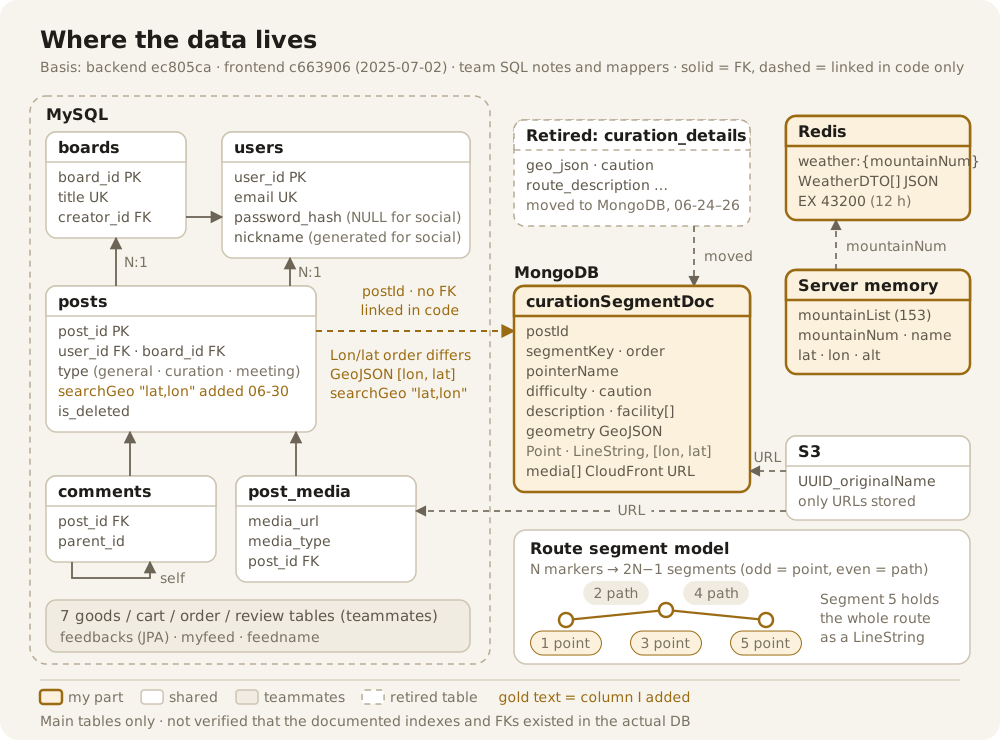
A curation post is split across two stores. Shared fields such as the title, board and representative coordinate live in the MySQL posts table. Segments (point name, notes, coordinates, media and so on) live in MongoDB documents, linked to the post by postId in application code, with no foreign key. The route and notes first lived in a MySQL detail table (curation_details). Between June 24 and 26, 2025 that content moved to MongoDB segment documents, and the code no longer uses the table.
A route is a sequence of alternating points and paths. N markers become 2N−1 segments (odd = point, even = path). The last point segment holds the whole route as a GeoJSON LineString ([lon, lat]). MySQL posts.searchGeo stores the average of the route coordinates as a "lat,lon" string.
Forecasts are fetched ahead of time into Redis, and the screen’s API reads only Redis. The key is weather:{mountainNum}, and it expires after 12 hours. On June 17 the weather source changed from the public data portal’s short-term forecast (grid conversion) to the KMA API Hub mountain point forecast (153 points). The 153 mountain points are loaded from a JSON file into server memory.
Authors on the map are found through the representative coordinate string. The query splits searchGeo and keeps the authors of posts within 3 km by spherical distance in SQL. Every row is parsed and run through trigonometry, so no index can be used.
Two flows
The numbers match the arrows in the diagram above.
Mountain forecast
- ① Collect.
WeatherSchedulersends the 153 points in batches of five, one batch after another (500 ms apart within a batch), and writes each result withSET weather:N … EX 43200. The June 17 version was aforloop withThread.sleep(800); the next day it became a Reactor pipeline. - Trigger.
@Scheduledwas commented out from the start. Running it at boot was enabled on June 18 and disabled on June 19. The committed final code has no automatic refresh path (see the limitations table). - ② Read.
GET /weather/summit?mountainNum=reads only Redis and groups the 09:00, 15:00 and 21:00 values by day. If there is no value, it returns 200 witherror. - ③ Mountain search. Looks up names in the in-memory list (up to 10 results).
Curation posts
- ⑤ Save. The screen first creates the
postsrow withPOST /posts/insert, then sendsPOST /mongo/curationSegments(segment JSON and per-segment files) with the returned postId. The server uploads each segment’s files to S3, fills in the CloudFront URLs and saves all segments at once (saveAll). - ⑥ Search. A regex on MongoDB
descriptionyields a set of postIds, and MySQL then reads the posts withboard_id = ? AND post_id IN (…). - Detail. The screen loads the post and its segments (
GET /mongo/curationSegments/{postId}) separately and combines them. - ⑦ Map. Clicking an author’s profile marker within 3 km opens that post.
Auth and media
- ⑧ Social login. Naver and Google login run on OAuth2 Client. The user is looked up or created by email (with a generated nickname), and access and refresh JWTs are set as HttpOnly cookies. On the final login screen, the button wired to this server flow is Naver’s.
- Request auth. On each request,
JWTFiltervalidates the token from the header or the cookie. On reload, the screen restores the login state withGET /api/user. - Upload. Files go to S3 under
UUID_originalNamekeys, and since June 19 the server returns CloudFront URLs.
Limitations (if I fixed them)
| Limitation | Impact | If I fixed it |
|---|---|---|
| The only tests are the generated defaults | Nothing guards against regressions | Tests, starting with forecast collection and segment saving |
Forecast: the final code has no automatic refresh trigger. onErrorResume sits before retryWhen, so the retry never runs (a failed mountain keeps an empty array for 12 hours), and there is no response timeout | Forecasts can be empty or stale | A scheduled trigger, retry in the right order, a timeout, and an expiry that matches the refresh interval |
Curation writes: nothing ties the MySQL → S3 → MongoDB saves together (success is reported once MySQL succeeds), and postId and ownership are not checked. Segment documents have no @Id field, and there is no update or delete path | A failure midway leaves the post and its segments out of sync, and segments can be attached to someone else’s post | Accept it in one request and let the server own the order, compensation and ownership check |
| Reads: the radius query parses a string and runs trigonometry for every row (no index, no LIMIT). The curation search term becomes a regex without escaping | Slows down as posts grow, and a search term can inject a regex | A coordinate column with a range pre-filter or a spatial index; escape the search term |
| Auth and config: the access token lasts about 20.8 days (the comment says 30 minutes), and the refresh token is only issued. Cookie authentication runs with CSRF protection disabled, and tokens are printed to standard output. Real keys were committed in config files while the repositories were public (made private in 2026-09; keys revoked and replaced afterwards) | Risk of token theft and key exposure | A short access token with refresh, CSRF protection, cleaned-up logs, secret scanning |
The source is in private team repositories. Basis: backend ec805ca, frontend c663906 (2025-07-02).